Setup Intel RealSense D455 with Jetson Orin Nano
/ 4 min read
Updated:Table of Contents
Step 1: Set up Jetson Orin
Reference: Jetson Orin Nano Setup This procedure was tested with JetPack 6.0 and Jetson Linux 36.3 in July 2024. Use it as a versioned record rather than a current-release guide.
- Flash Q-SPI with scripts
- Flash SSD with scripts
- Install the remaining JetPack components with
apt.
Step 2: Set up Intel RealSense D455
Reference: Official Guide
LibRealSense SDK Backend
Comparing with the installation for general Ubuntu, L4T has 2 USB drivers as LibRealSense SDK Backend:
- Linux native kernel drivers for UVC, USB and HID (Video4Linux and IIO respectively)
- Using
RSUSB- user-space implementation of the UVC and HID data protocols, encapsulated and activated by selecting the SDK’s-DFORCE_RSUSB_BACKENDflag (a.k.a.-DFORCE_LIBUVCwith SDK versions prior to v.2.30). When the second method is selected Librealsense2 communicates with the devices using the standard USB driver, while the higher-level protocols (UVC/HID) stacks are compiled directly into the SDK. The RSUSB backend avoids patching the Jetson kernel and was selected for this setup. It can have different performance and feature tradeoffs from the native kernel backend. Check current package support before deciding to build from source.
Building from source rather than using binary
Use the script below to download, compile, and install the tested librealsense release. The following scripts are modified for these purposes:
- Pin librealsense 2.55.1 rather than downloading a moving development branch.
- Enable parallel compilation with
make -j6. - Enable CUDA and specify the compiler with
-DCMAKE_CUDA_COMPILER="/usr/local/cuda/bin/nvcc" -DBUILD_WITH_CUDA=true. - Enable the RSUSB backend with
-DFORCE_RSUSB_BACKEND=true. Note: - The script downloads source code into
~/librealsense_build. - The another backend or the installation with apt cause conflict. Remove them before installation.
- Compiling time may lasts over 10 minutes.
#!/bin/bash -xe
# Locally suppress errors while checking for connected video devices.exec 3>&2exec 2> /dev/nullcon_dev=$(ls /dev/video* | wc -l)exec 2>&3
if [ $con_dev -ne 0 ];then        echo -e "\e[32m"        read -p "Remove all RealSense cameras attached. Hit any key when ready"        echo -e "\e[0m"fi
lsb_release -aecho "Kernel version $(uname -r)"sudo apt-get updatecd ~/mkdir librealsense_build && cd librealsense_build
if [ $(sudo swapon --show | wc -l) -eq 0 ];then        echo "No swap found - setting up a 2 GiB swap file"        sudo fallocate -l 2G /swapfile        sudo chmod 600 /swapfile        sudo mkswap /swapfile        sudo swapon /swapfile        sudo swapon --showfi
echo Installing Librealsense-required dev packagessudo apt-get install git cmake libssl-dev freeglut3-dev libusb-1.0-0-dev pkg-config libgtk-3-dev unzip -y#rm -f ./master.zip
wget https://github.com/IntelRealSense/librealsense/archive/refs/tags/v2.55.1.zipunzip ./v2.55.1.zip -d .cd ./librealsense-2.55.1
echo Install udev-rulessudo cp config/99-realsense-libusb.rules /etc/udev/rules.d/sudo cp config/99-realsense-d4xx-mipi-dfu.rules /etc/udev/rules.d/sudo udevadm control --reload-rules && sudo udevadm triggermkdir build && cd buildcmake ../ -DCMAKE_CUDA_COMPILER="/usr/local/cuda/bin/nvcc" -DFORCE_RSUSB_BACKEND=true -DBUILD_WITH_CUDA=true -DCMAKE_BUILD_TYPE=Releasemake -j6sudo make installecho -e "\e[92m\n\e[1mLibrealsense script completed.\n\e[0m"
Step 3: Verify the setup
Plug in the USB cable before running the verification commands.
Output of lsusb
Bus 002 Device 007: ID 8086:0b5c Intel Corp. Intel(R) RealSense(TM) Depth Camera 455Bus 002 Device 001: ID 1d6b:0003 Linux Foundation 3.0 root hubBus 001 Device 003: ID 8087:0a2b Intel Corp. Bluetooth wireless interfaceBus 001 Device 002: ID 1a40:0101 Terminus Technology Inc. HubBus 001 Device 005: ID 2717:5010 Xiaomi Inc. Mi Wireless ComboBus 001 Device 001: ID 1d6b:0002 Linux Foundation 2.0 root hubOutput of lsusb -t
lsusb -t/: Bus 02.Port 1: Dev 1, Class=root_hub, Driver=tegra-xusb/4p, 10000M |__ Port 2: Dev 7, If 0, Class=Video, Driver=uvcvideo, 5000M |__ Port 2: Dev 7, If 1, Class=Video, Driver=uvcvideo, 5000M |__ Port 2: Dev 7, If 2, Class=Video, Driver=uvcvideo, 5000M |__ Port 2: Dev 7, If 3, Class=Video, Driver=uvcvideo, 5000M |__ Port 2: Dev 7, If 4, Class=Video, Driver=uvcvideo, 5000M |__ Port 2: Dev 7, If 5, Class=Human Interface Device, Driver=usbhid, 5000M/: Bus 01.Port 1: Dev 1, Class=root_hub, Driver=tegra-xusb/4p, 480M |__ Port 2: Dev 5, If 0, Class=Human Interface Device, Driver=usbhid, 12M |__ Port 2: Dev 5, If 1, Class=Human Interface Device, Driver=usbhid, 12M |__ Port 3: Dev 2, If 0, Class=Hub, Driver=hub/4p, 480M |__ Port 4: Dev 3, If 0, Class=Wireless, Driver=btusb, 12M |__ Port 4: Dev 3, If 1, Class=Wireless, Driver=btusb, 12MGraphical interface of realsense-viewer:
The GPU usage indicates the CUDA is enabled.
IMU and camera work fine.
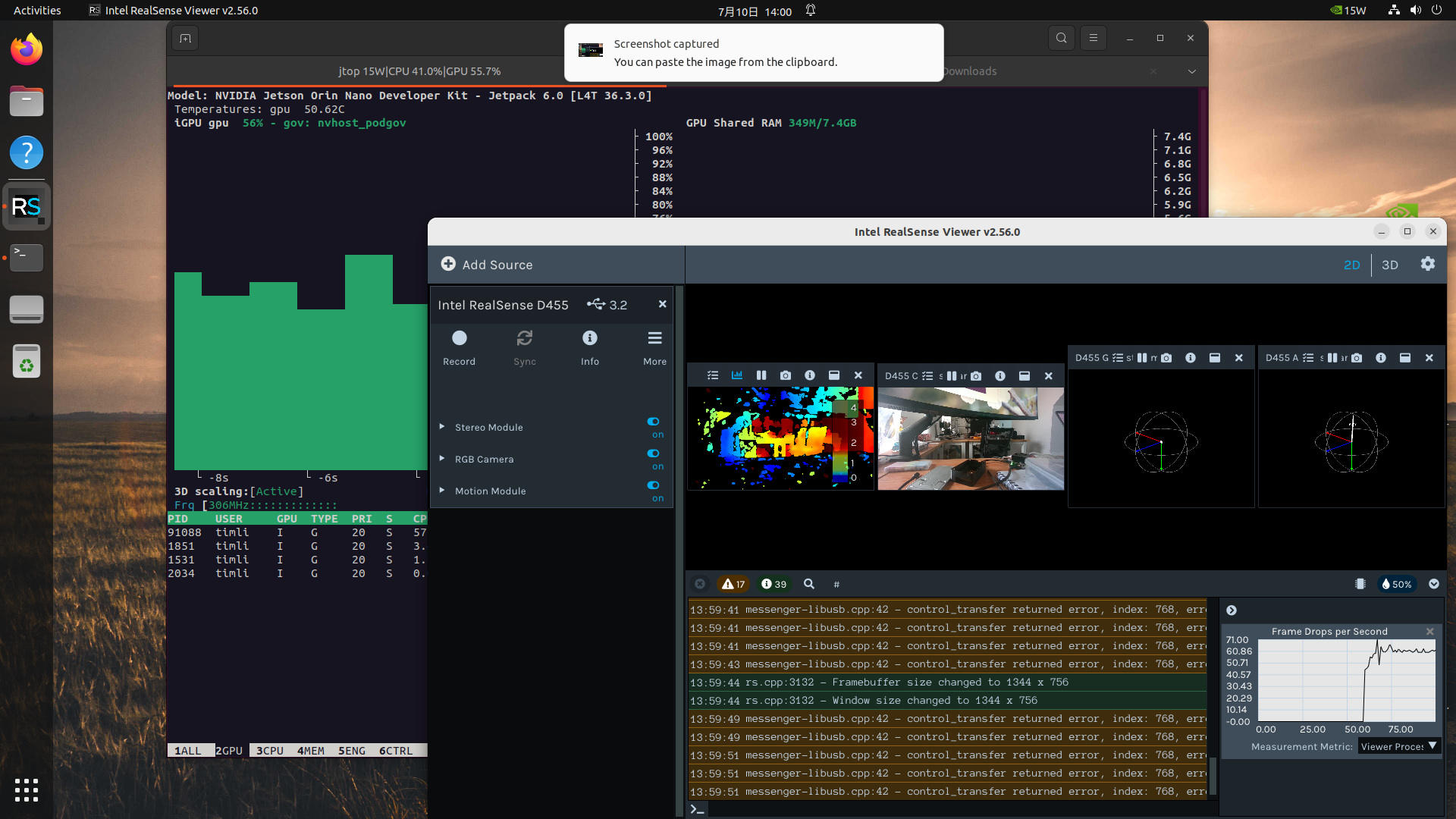
The lsusb -t example above shows uvcvideo bound to the camera interfaces. Confirm the backend actually used by librealsense in its logs; the USB driver’s presence alone does not prove that the application is using the RSUSB backend.