Setup Intel RealSense D455 with Jetson Orin Nano
Step1: Setup Jetson Orin
Reference: Jetson-Orin-Nano-Setup
The latest release of Jetpack comes to JP6.0 rev3, some minimal fixes are patched.
- Flash Q-SPI with scripts
- Flash SSD with scripts
- Install Jetpack with apt manually
Step2: Setup Intel RealSense D455
Reference: Official Guide
LibRealSense SDK Backend
Comparing with the installation for general Ubuntu, L4T has 2 USB drivers as LibRealSense SDK Backend:
- Linux native kernel drivers for UVC, USB and HID (Video4Linux and IIO respectively)
- Using
RSUSB- user-space implementation of the UVC and HID data protocols, encapsulated and activated by selecting the SDK’s-DFORCE_RSUSB_BACKENDflag (a.k.a.-DFORCE_LIBUVCwith SDK versions prior to v.2.30).
When the second method is selected Librealsense2 communicates with the devices using the standard USB driver, while the higher-level protocols (UVC/HID) stacks are compiled directly into the SDK.
For the best compatibility, the second method is preferred.
Installation withaptis not available
Building from source rather than using binary
Use libuvc_installation.sh in scripts to download compile and install.
The following scripts are modified for these purposes:
- Use
developmentbranch instead ofmasterbranch to support IMU in Jetpack6.x - Enable parallel compiling with
make -j6 - Enable
CUDAand assertCUDA_COMPILERwith flag:-DCMAKE_CUDA_COMPILER="/usr/local/cuda/bin/nvcc" -DBUILD_WITH_CUDA=true - Enable
RSUSBbackend with flag-DFORCE_RSUSB_BACKEND=true(DFORCE_LIBUVCis used for SDK versions prior to v.2.30)
Note: - The scripts would download source code in
~/librealsensefolder. - The another backend or the installation with apt cause conflict. Remove them before installation.
- Compiling time may lasts over 10 minutes.
1
2
3
4
5
6
7
8
9
10
11
12
13
14
15
16
17
18
19
20
21
22
23
24
25
26
27
28
29
30
31
32
33
34
35
36
37
38
39
40
41
42
43
44
45
46
47
48
49
50
#Locally suppress stderr to avoid raising not relevant messages
exec 3>&2
exec 2> /dev/null
con_dev=$(ls /dev/video* | wc -l)
exec 2>&3
if [ $con_dev -ne 0 ];
then
echo -e "\e[32m"
read -p "Remove all RealSense cameras attached. Hit any key when ready"
echo -e "\e[0m"
fi
lsb_release -a
echo "Kernel version $(uname -r)"
sudo apt-get update
cd ~/
sudo rm -rf ./librealsense_build
mkdir librealsense_build && cd librealsense_build
if [ $(sudo swapon --show | wc -l) -eq 0 ];
then
echo "No swapon - setting up 1Gb swap file"
sudo fallocate -l 2G /swapfile
sudo chmod 600 /swapfile
sudo mkswap /swapfile
sudo swapon /swapfile
sudo swapon --show
fi
echo Installing Librealsense-required dev packages
sudo apt-get install git cmake libssl-dev freeglut3-dev libusb-1.0-0-dev pkg-config libgtk-3-dev unzip -y
#rm -f ./master.zip
wget https://github.com/IntelRealSense/librealsense/archive/development.zip
unzip ./development.zip -d .
cd ./librealsense-development
echo Install udev-rules
sudo cp config/99-realsense-libusb.rules /etc/udev/rules.d/
sudo cp config/99-realsense-d4xx-mipi-dfu.rules /etc/udev/rules.d/
sudo udevadm control --reload-rules && sudo udevadm trigger
mkdir build && cd build
cmake ../ -DCMAKE_CUDA_COMPILER="/usr/local/cuda/bin/nvcc" -DFORCE_LIBUVC=true -DFORCE_RSUSB_BACKEND=true -DBUILD_WITH_CUDA=true -DCMAKE_BUILD_TYPE=release
make -j6
sudo make install
echo -e "\e[92m\n\e[1mLibrealsense script completed.\n\e[0m"
Step3: Verify the setup
Plugin the USB cable first.
Output of lsusb
1 | Bus 002 Device 007: ID 8086:0b5c Intel Corp. Intel(R) RealSense(TM) Depth Camera 455 |
Output of lsusb -t
1 | lsusb -t |
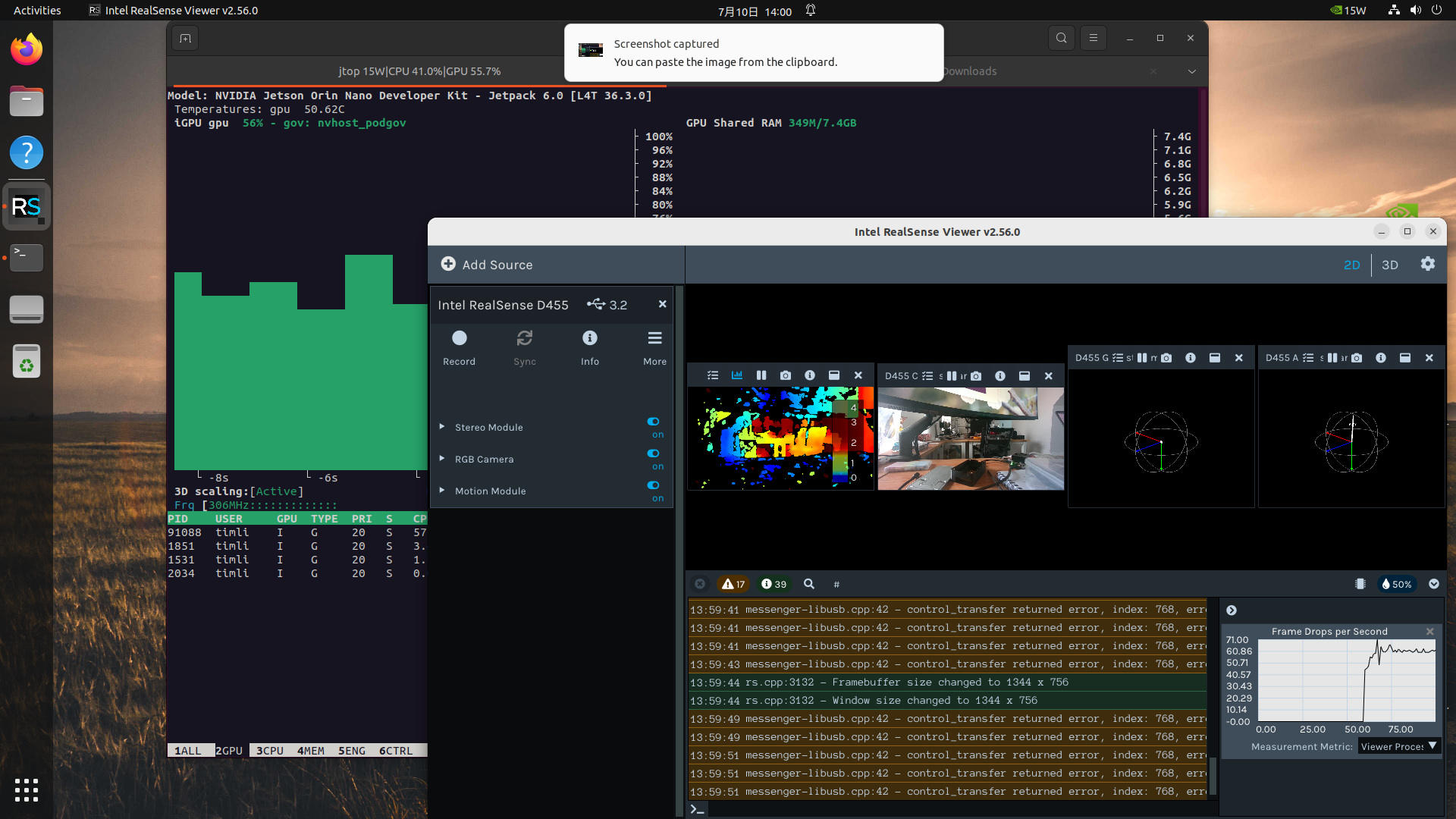
Graphic interface of realsense-viewer
The development branch has a different version number than master branch.
The GPU usage indicates the CUDA is enabled.
IMU and camera work fine.